WordPress Website Maintenance Checklist to Enhance Site Optimization

Welcome to the guide on WordPress website maintenance! If you think creating a WordPress site is the end of the journey, think again. Maintenance is the unsung hero that keeps your website running smoothly, securely, and efficiently. From regular updates and backups to optimizing performance, our comprehensive guide will walk you through the essential tasks that should never be ignored. So, whether you’re a seasoned developer or a WordPress newbie, read on to discover how to keep your site in tip-top shape!
It’s really important for WordPress site owners to grasp the significance of keeping their sites in good shape. This means they stay strong, safe, and work at their best. Don’t forget, taking care of things ahead of time is what keeps your online presence healthy and strong. So, remember, regular upkeep is the key for a successful and lasting website.
What is WordPress Website Maintenance?
WordPress website maintenance is the process of regularly checking and optimizing your WordPress site to ensure your website performance, security, and user experience. Just like a car requires periodic servicing to run smoothly, A WordPress site needs maintenance to function at its best.
What is the difference between Updates and Upgrades?
At first glance, “updates” and “upgrades” might seem synonymous. However in the field of WordPress, they have different meanings:
- Updates: It refers to the periodic releases of new versions of the platform. These updates primarily focus on bug fixes, security enhancements, and minor feature additions, ensuring your website runs smoothly and securely.
- Upgrades: On the other hand, upgrades denote major advancements, often involving significant alterations to the core functionalities or the addition of substantial features. Upgrades may involve migration to a newer version or transitioning to a more comprehensive package.
Why are regular backups the backbone of WordPress site maintenance?
Your website is protected by backups. In the event of a cyber-attack, data loss, or any unforeseen mishap, having a recent backup means you can restore your site to its previous state without significant website downtime. Regular backups ensure that you’re always prepared, safeguarding your website’s data and your peace of mind.
How do I Maintain a WordPress Site?
Maintaining a site is daunting. But by following our WordPress website maintenance checklist, it becomes manageable for you. Here’s step-by-step approach:
1. Prioritize the Security of the WordPress Website
In today’s digital world, WordPress powers more than 43% of all websites globally so keeping your WordPress site safe from cyber threats is a must. To do this, use strong security measures like advanced firewalls and top-notch anti-malware tools. They act as a powerful shield against potential attacks. If you haven’t already, consider adding a reliable WordPress security plugin. It’s a crucial step in fortifying your website and ensuring your online assets stay safe.
2. Backup your site
The importance of regular backups cannot be overstated. Unexpected events, from technical glitches to cyberattacks, can compromise your website’s data. By using trustworthy backup plugins or external backup services, you can automate this process, ensuring that your data remains safe and retrievable.
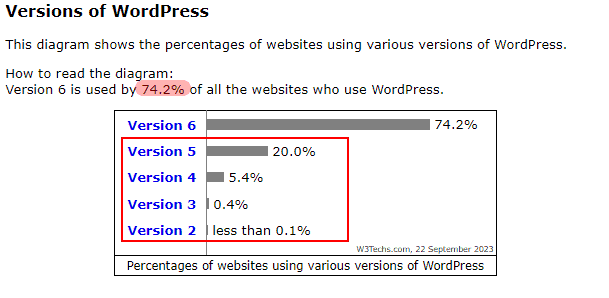
3. Upgrade your WordPress Site version
WordPress is an evolving platform, with new versions released periodically. These versions often come packed with enhanced features and crucial security patches. Staying updated ensures that your website benefits from the latest improvements and remains secure against known vulnerabilities.
4. Update your Website Plugins
Think of plugins as handy tools that can supercharge your WordPress site. Similar just like any tool, they require regular sharpening and updating. In 2022, small and mid-sized businesses were involved in 43% of all data breaches, as opposed to large corporations. When plugins fall behind on updates, they can become weak points for cyber threats to target. Therefore, it’s vital to consistently update them to the newest versions available. By doing this, you’re not just safeguarding your site, but also enjoying the latest enhancements and features.
5. Update your WordPress Website Theme
Just like plugins, themes are regularly updated by their developers. These updates often bring about aesthetic improvements, bug fixes, and enhanced security. Ensure you’re using the latest version of your theme to provide your visitors with the best experience.
6. Optimize your WordPress Site database
Like your computer or phone, a website can get cluttered as it grows. This extra stuff can slow it down. But no worries! Regular cleanups, like tidying up a room, keep things organized. When you clean up your website’s storage (we call it the database), it runs faster, and pages load quickly. It’s like giving your site a spring cleaning for top-notch performance!
7. SEO matter in the Site Maintenance
When you’re taking care of your WordPress website, SEO (Search Engine Optimization) should be on your radar, and here’s why. SEO plays a vital role in how well your site performs in search engine results. Regular maintenance ensures that search engines can easily find and understand your content. Keeping your site updated with fresh, relevant information tells search engines that your site is active and worth showcasing.
Additionally, a well-maintained website offers a better experience to your visitors, which search engines like Google appreciate. So, during maintenance, don’t forget to fix technical issues, optimize images, and keep your site secure – these steps all contribute to maintaining good SEO and a strong online presence.
8. Clean up your website’s unnecessary cache
Think of cached data as your website’s trusty shortcut, ensuring lightning-fast loading. Yet, like any well-used path, it can accumulate a bit of clutter over time. That’s when things start to lag. To keep your website gliding smoothly, it’s wise to tidy up these old shortcuts every now and then.
Finding the perfect cache plugins, custom-fit for your website, makes this task a breeze. This way, your visitors will always relish a seamless experience, with pages popping up in an instant, enhancing their time spent on your site.
9. Test for Browser and Device compatibility
When you’re in the process of maintaining your WordPress website, one of the critical checks is ensuring that your site is responsive. This means it should adapt and function smoothly on various browsers and devices. With the multitude of options out there, versatility is key.
Regular testing is your ally in guaranteeing visitors enjoy a seamless and consistent experience, regardless of how they access your site. This ensures that your website doesn’t just look great, but it performs at its best on any platform.
10. Check your current site speed and improve
A slow-loading website can be a major deterrent for visitors, leading to increased bounce rates. Utilize tools to monitor your site’s loading speeds and implement strategies to enhance its performance.
11. Test your contact forms
Contact forms serve as a direct channel to engage with your potential clients or customers. If a form isn’t working properly, it could mean missing out on valuable opportunities. That’s why it’s important to regularly test and make sure these forms are in top shape. This way, you can stay connected and responsive to your audience’s needs.
3 Daily WordPress Site Maintenance Tasks to Consider
- Backing Up Your Website: Essential to recover from unexpected data losses.
- Monitoring Website Uptime: Ensures your site is always accessible to visitors.
- Checking for Broken Links: Enhances user experience and SEO.
4 Weekly WordPress Site Maintenance Tasks to Consider
- Reviewing Website Security Scans: Detects vulnerabilities and threats.
- Checking Website Loading Speed: A faster website provides a better user experience.
- Updating Plugins and Themes: Keeps your site secure and functional.
- Moderating and Responding to Comments: Engages with your audience and builds community.
How much time does WordPress Site Maintenance need?
The time required for WordPress maintenance varies based on the website’s complexity and the frequency of updates. However, daily tasks might take 10-15 minutes, while weekly tasks could require a couple of hours.
How much does WordPress Website Maintenance cost?
The cost of WordPress maintenance can vary based on the complexities of your website and the specific services you choose. To get an accurate quote, it’s best to reach out to a reputable WordPress website maintenance services provider. We have a team of experienced developers who ensure that all necessary parameters are met when maintaining a WordPress site.
Maximize your site’s potential with WordPress Maintenance!
When it comes to managing your website, regular maintenance is important. If you are not able to manage your website, get in touch with a company that provides WordPress website maintenance service. So they maintain your website regularly, ensuring not only a smoothly operating site but also keeping everything in check. because this isn’t a one-time task; it’s an ongoing commitment to the health of your site.
As you partner with the company, ensure they follow the website maintenance checklist. This proactive approach guarantees a secure, efficient, and user-friendly experience. Prioritize a company that understands the significance of this holistic strategy, providing your website with the care it truly deserves.
I'm currently a WordPress developer at Samarpan Infotech. My interests include Web Development. In my spare time, I enjoy reading and surfing the internet.