Shopify Discounts Explained: Types, Features & Easy Setup

In the competitive world of e-commerce, offering discounts is a powerful strategy to attract customers, increase sales, and enhance customer loyalty. Shopify, one of the leading e-commerce platforms globally, provides a robust discount system that allows merchants to create various promotional offers tailored to their business needs.
In this guide will delve into the types of discounts available in Shopify, key features of its discount system, and detailed methods for setting up these discounts effectively. Whether you’re a seasoned seller or just starting out, understanding how to leverage Shopify’s discount features can significantly impact your store’s success.
Types of Discounts in Shopify
Shopify offers several types of discounts that cater to different marketing strategies. Here’s a closer look at the most common discount types:
1. Amount Off Products
This type of discount allows merchants to offer a specific monetary amount off the price of individual products. For example, if you sell a t-shirt for $20, you could create a discount that reduces the price to $15. This straightforward approach is effective for encouraging customers to purchase specific items.
2. Buy X Get Y
The “Buy X Get Y” discount is a popular promotional tactic that incentivizes customers to buy more by offering a free or discounted item when they purchase a specified quantity of another item. For instance, if a customer buys two pairs of shoes, they might receive a third pair at no cost or at a reduced price. This strategy not only increases average order value but also helps in clearing out inventory.
3. Amount Off Order
This discount applies a fixed amount off the total order value rather than individual products. For example, you could offer $10 off any order over $50. This type of discount encourages customers to increase their cart size to qualify for savings, thus boosting overall sales.
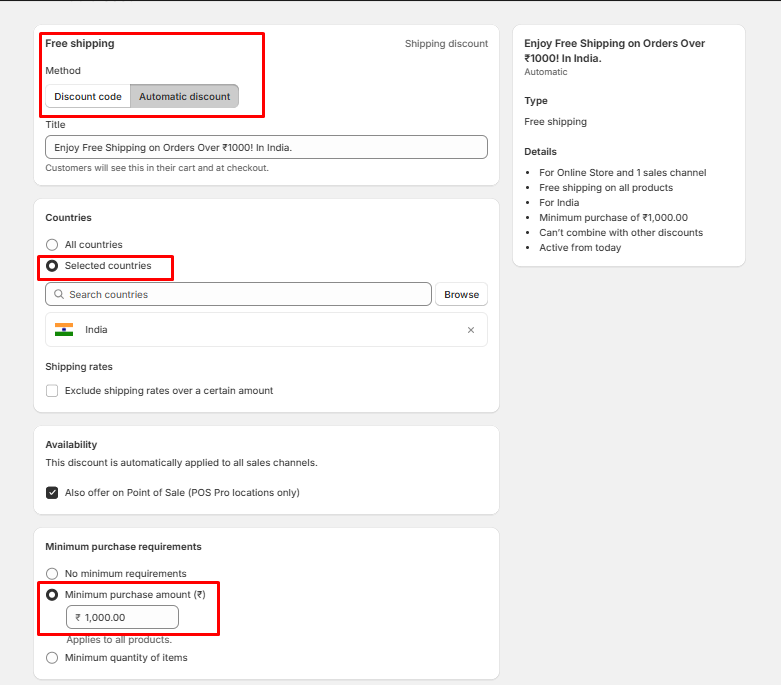
4. Free Shipping
Free shipping is one of the most sought-after discounts by online shoppers. By offering free shipping on orders over a certain amount (e.g., free shipping on orders over $75), you can reduce cart abandonment rates and encourage customers to complete their purchases. This tactic is particularly effective in enhancing customer satisfaction and loyalty.
Key Features of Shopify’s Discount System
Shopify’s discount system is not just about creating discounts; it comes with several features that enhance its functionality and usability. Here are some key features:
- Automatic Discounts: Automatic discounts are applied at checkout without requiring customers to enter a code. This feature simplifies the shopping experience and ensures that all eligible customers receive their discounts seamlessly.
- Discount Codes: Discount codes are promotional codes that customers can enter at checkout to receive their discounts. These codes can be shared via email campaigns, social media, or directly on your website. They add an element of exclusivity and urgency, especially when tied to limited-time offers.
- Customer Eligibility: Shopify allows merchants to set eligibility criteria for discounts based on customer segments. For example, you can create discounts specifically for first-time buyers or loyal customers who have made multiple purchases. This targeted approach helps in personalizing marketing efforts.
- Target Discounts Based On: Merchants can target discounts based on various factors such as specific products, collections, or customer groups. This flexibility enables businesses to craft tailored promotions that resonate with their audience and drive sales effectively.
- Product Eligibility: When setting up discounts, you can specify which products are eligible for the discount. This feature is particularly useful for promoting new arrivals or clearing out seasonal inventory while ensuring that other products remain at full price.
- Usage Limits: Shopify allows you to set limits on how many times a discount can be used by an individual customer or in total across all customers. This feature helps prevent abuse of promotional offers and maintains profitability.
- Minimum Purchase Requirements: You can establish minimum purchase requirements for discounts, ensuring that customers must spend a certain amount before qualifying for savings. This tactic encourages larger purchases while still providing value to customers.
How to Create Shopify Automatic Discounts
Setting up automatic discounts in Shopify is straightforward. Below are step-by-step methods for creating different types of automatic discounts.
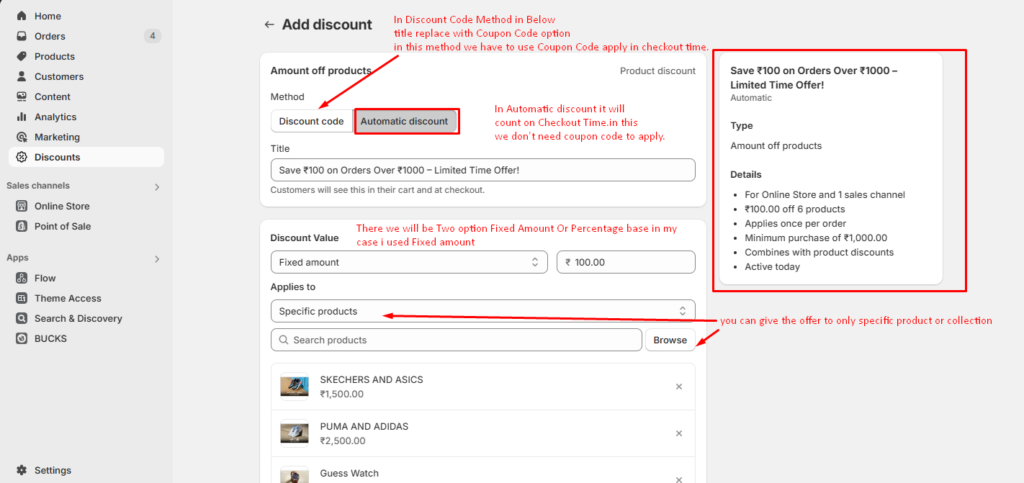
1. Amount off Products
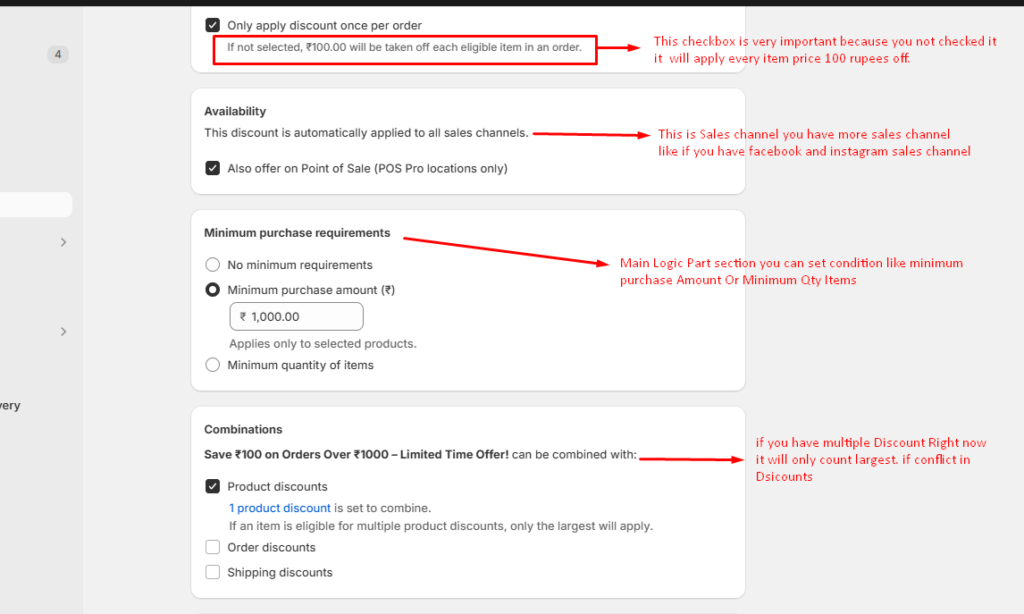
In this method, you can apply discounts to specific products or product collections. You need to set basic conditions such as a minimum amount or minimum quantity of items. The discount value can be either a fixed amount or a percentage.
Minimum Purchase Requirements: You can set a minimum purchase amount or a minimum quantity of items in the cart for the discount to be applied.
Discount Type: The discount can be either fixed (e.g., ₹100 off) or percentage-based (e.g., 10% off) on your specific products or Specific Collection .
Product or Collection Specific:
You can target discounts for specific products or a product collection. This allows you to offer discounts only when certain items are added to the cart, such as “Buy a T-shirt and get a discount on a Bag”. You can set Start dates and End Dates also and Save.
How to Setup
- Navigate to Discounts: Go to your Shopify admin panel. Click on “Discounts” from the left-hand menu.
- Create Discount: Click on “Create Discount” and select “Automatic Discount.”
- Choose Discount Type: Select “Amount Off Products.”
- Fill in Details:
- Name: Give your discount a clear name. (Spend ₹1000 or more and get ₹100 off)
- Discount Amount: Specify the amount off. (Fixed amount ₹100 off )
- Applies To: Choose whether it applies to all products or specific ones.
- Active Dates: Set start and end dates if applicable.
- Save: Click “Save” to activate your discount.
2. Buy X get Y
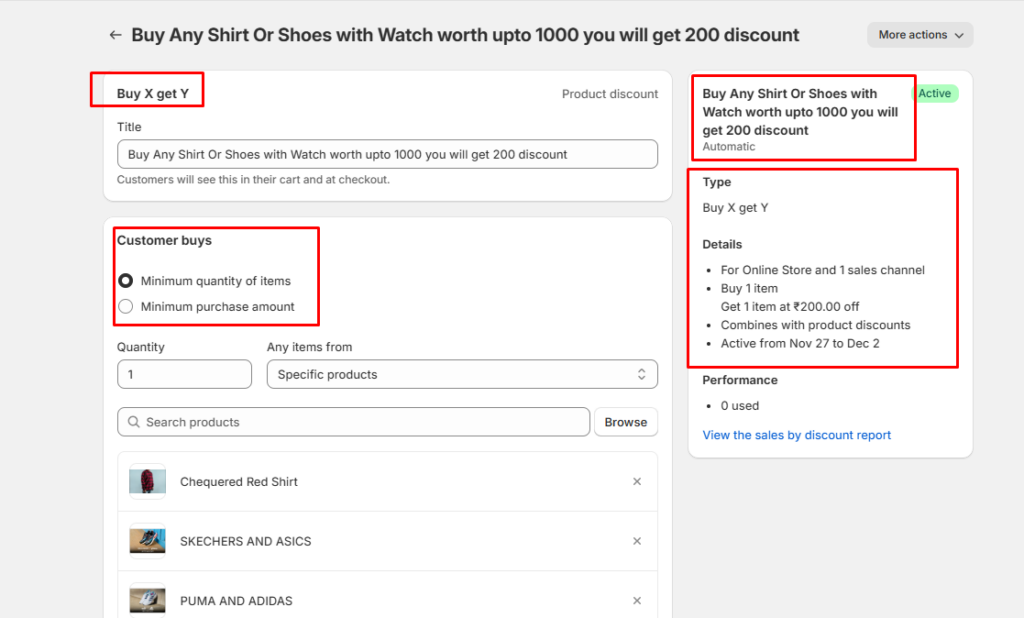
In this Method, the Buy X Get Y discount type allows you to set up conditional discounts where customers can get free or discounted items when they meet specific purchase requirements. The conditions you can use in this discount type are:
Buy X Conditions
- Specific Products or Collections: Customers must purchase specific products or products from a collection to qualify.
- Minimum Quantity of Items: Set the minimum number of items the customer must add to their cart from the selected products or collections.
- Minimum Purchase Amount: Customers need to spend a certain amount on the selected products or collections.
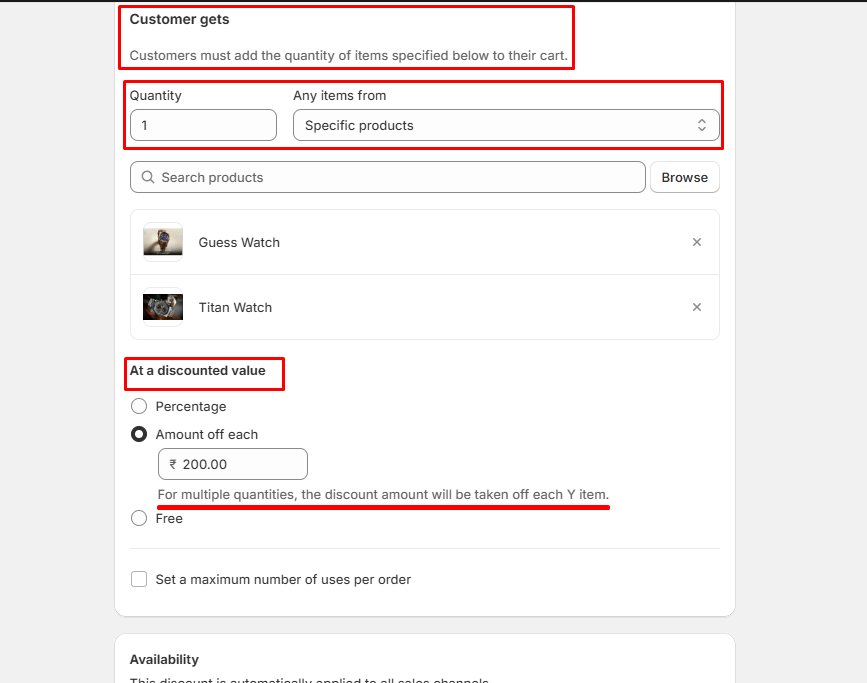
Get Y Conditions
- Specific Products or Collections: Choose the product(s) or collection(s) that customers will receive as part of the offer.
- Discount Type: The “Y” products can be offered:
- Free
- At a Percentage Discount
- At a Fixed Discount (e.g., ₹100 off per item).
- Quantity of Items: Define how many “Y” products customers can get based on their qualifying “X” purchases.
Example Use Case
- Offer Title: “Buy 2 T-Shirts, Get 1 Hat at 50% Off”
- Condition: Customers must buy at least 2 T-shirts from a specific collection.
- Reward: They get a hat at 50% off.
How to Setup
- Create Discount: Navigate to Discounts, Click “Create Discount” and select “Automatic Discount.”
- Choose Discount Type: Select “Buy X Get Y.”
- Fill in Details:
- Name: Enter a descriptive name.
- Buy X Quantity: Specify how many items must be purchased.
- Get Y Quantity: Indicate what the customer will receive (free or discounted).
- Applies To: Choose applicable products.
- Save.
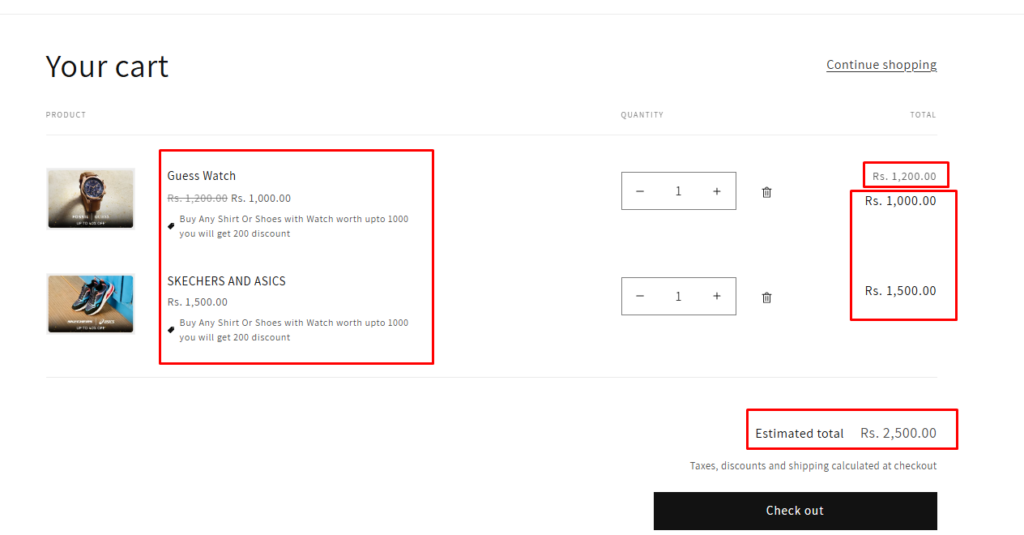
Shopify’s Buy X Get Y feature is great for creating bundle offers or encouraging customers to add more items to their carts.
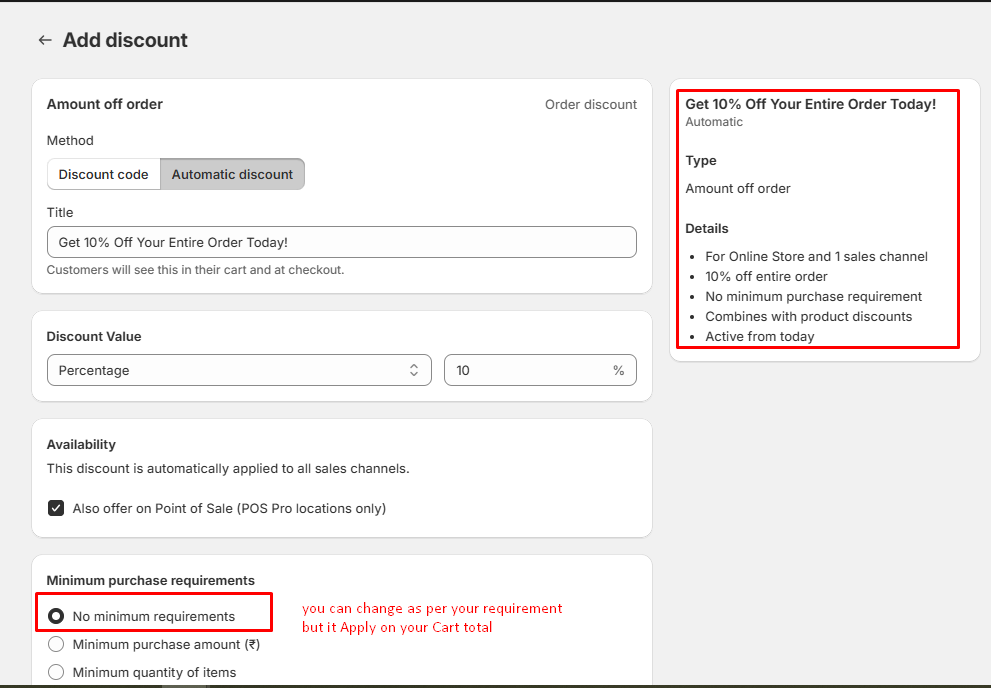
3. Amount off order
This method is similar to the first method, Amount Off Products.
In the Amount Off Products method, the discount is applied to specific products or collections. In contrast, this method applies the discount to the entire cart or order total. You can set Start dates and End Dates also and Save.
4. Free shipping
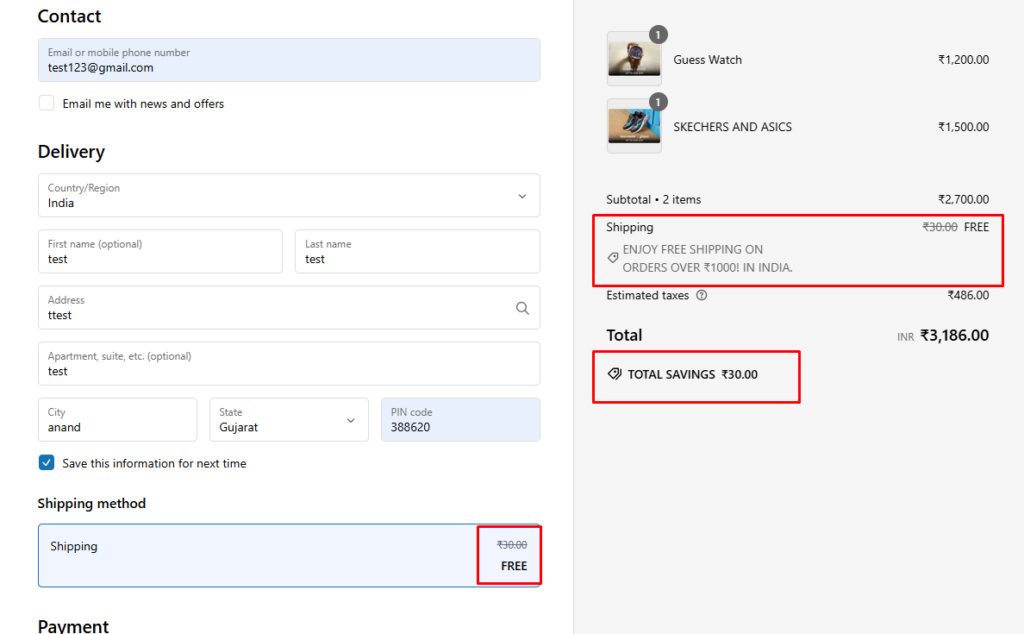
Customers can enjoy free shipping when they meet the specified condition, in my case such as a minimum purchase amount (e.g., ₹1000) or the inclusion of specific items in their cart. This discount automatically applies at checkout, making it easy and convenient for eligible orders.
Conclusion
Shopify provides a variety of discount methods, each designed to encourage purchases and improve sales. Whether you’re offering a percentage off, a fixed amount off, or free shipping, the flexibility in how you apply these discounts can significantly enhance customer experience and increase your store’s conversion rates.
The Amount Off Products method is perfect for targeted promotions, offering discounts on specific products or collections, while the Amount Off Order method applies discounts to the entire cart, motivating customers to spend more. Additionally, methods like Buy X Get Y or Free Shipping can further entice customers, offering added value based on their purchase behavior.
If you have any questions about Shopify discounts or need technical assistance, our experienced Shopify developers are here to help you every step of the way. Whether you need guidance on setting up discounts or troubleshooting issues, we’re ready to support you in setting up discounts in your Shopify store.
I'm currently a WordPress & Shopify developer at Samarpan Infotech, I'm passionate about web development. Beyond coding, I have a curious mind for world affairs and geopolitics, while also enjoying the occasional chess match in my spare time.